Why Occasio
Honest, calm design
Cream canvas, coral accents, and copy that says what happens next — no hype, no guilt trips.
Example message
“Still the first person I want to tell good news. Happy birthday, Ananya.”
Occasio · Android beta
Pick an occasion, add a photo, share a private link in minutes. When they open it, it's the kind of moment that stays — not another forgotten notification.
Want early access? Email developernick1@gmail.com and we'll add you to the test group.
Free to create · Recipients open a link — no app required
No account to start
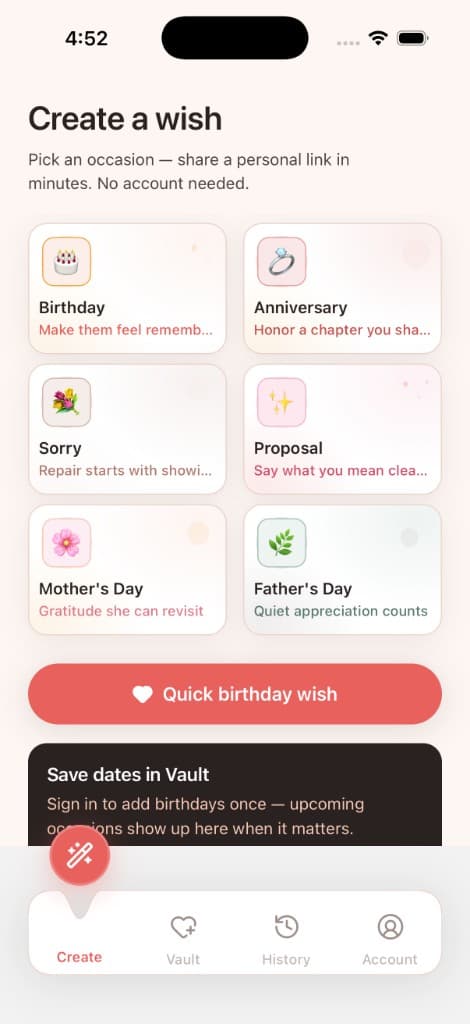
Guests can pick a template, add photos, and share a link — sign in only when you want Vault.
Private share links
Only people with the link can view a card. Unlisted — not searchable online.
Recipients need no app
Cards open in the browser over WhatsApp, SMS, or email.
Inside the app
Tap a tab below to explore Create, Vault, Account, and sign-in — real screens from the mobile app.
Pick an occasion, add photos, and write a short message. Preview everything before you share.
Occasions
Start with a template tuned to the relationship — then make it personal with your words and photos.
Occasio is a vault for the people you care about — not another generic e-card app.
Why Occasio
Cream canvas, coral accents, and copy that says what happens next — no hype, no guilt trips.
Example message
“Still the first person I want to tell good news. Happy birthday, Ananya.”
Recipients open a link in their browser. No app install required to receive a wish.
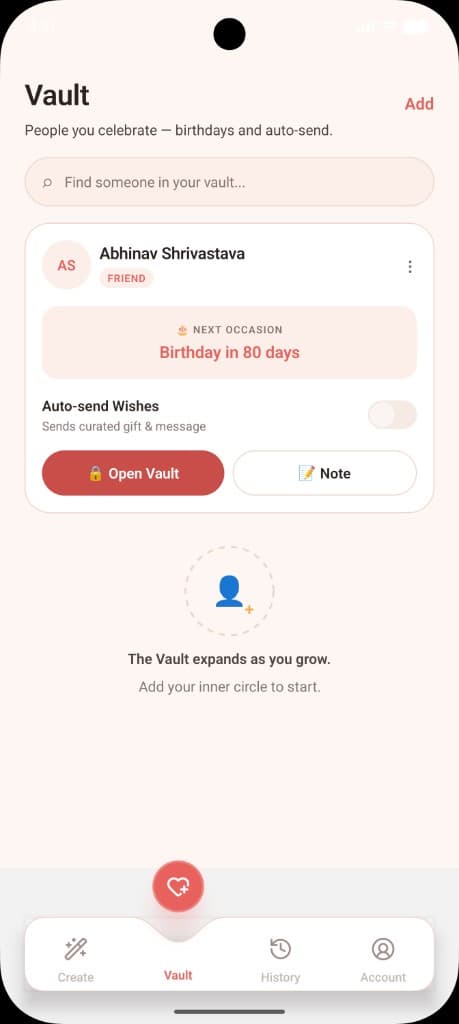
Track people and upcoming birthdays on Create. Auto-send is on the roadmap — never required to share today.
Vault
Add birthdays for the people you celebrate. Occasio surfaces upcoming dates on Create — with a clear countdown so you are not surprised at 80 days or 8.
Open the link they shared — your card plays right in the browser. No sign-up needed to view it.
Want to send one back? Join the Android beta or email us for access.
Pick an occasion, share a link, and save people to Vault when you are ready. Try the Android beta today — we'd love your feedback.
Need an invite? Email developernick1@gmail.com and we'll get you on the internal test list.